WiFiman
v1.3.0FreeReleased 23 Sept 2026
Ubiquiti's free Wi-Fi analyser, speed test and network scanner for phones and PCs. By Ubiquiti Inc.
- Windows
- macOS
- Linux
- Android
- iOS
By the ToolsBharat teamUpdated 23 Sept 2026How we check
Quick answer
WiFiman is free software for Windows, macOS, Linux, Android and iOS from Ubiquiti Inc.. Ubiquiti's free Wi-Fi analyser, speed test and network scanner for phones and PCs. Download it only from ui.com. The latest version we track is 1.3.0 (23 Sept 2026). ToolsBharat links straight to the publisher's own download page, with no bundled offers.
- Latest version:
- 1.3.0 (23 Sept 2026)
- Publisher:
- Ubiquiti Inc.
- Official site:
- ui.com
- Licence:
- Free — Proprietary — free and ad-free
- Requirements:
- Android 8.0 or later; iOS 18.0 or later; WiFiman Desktop: Windows 10, macOS 13, Ubuntu 22 or later
Our verdict
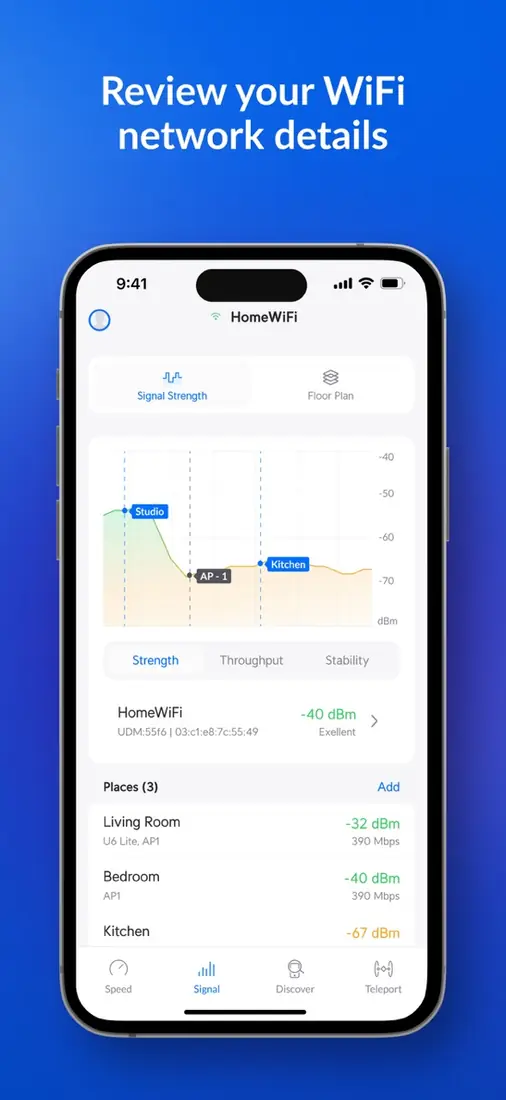
WiFiman is a free, ad-free toolkit from Ubiquiti that works on any network, not just UniFi. On a phone it scans nearby Wi-Fi channels and signal strength and runs speed tests; the desktop version adds a subnet scan that finds devices using Bonjour, SNMP, NetBIOS and Ubiquiti discovery, plus Teleport VPN into UniFi networks. It has effectively replaced Ubiquiti's old Device Discovery Tool. Ubiquiti's Security Advisory Bulletin 072 covers WiFiman Desktop for macOS — make sure you are on 1.3.0 or later. Google Play shows 10,000,000+ installs.
Screenshots


Key features
- Wi-Fi channel and signal scanner with speed tests
- Desktop subnet scan using Bonjour, SNMP, NetBIOS and Ubiquiti discovery
- Teleport VPN into UniFi networks
- Desktop builds for Windows, macOS and Linux (x64 and ARM64)
Pros
- Pro: Free with no ads
- Pro: Works on non-Ubiquiti networks too
Cons
- Con: Needs iOS 18 or later on iPhone
- Con: Ubiquiti does not publish checksums for the desktop installers
What's new in 1.3.0
See what changed in 1.3.0 in the official release notes
Version history
Version 1.3.0Latest
23 Sept 2026- SHA-256
- The developer does not publish one
- Source
- Release notes
Version Android 2.14.0 · iOS 1.37.1 · Desktop 1.3.0
date not stated- SHA-256
- The developer does not publish one
- Source
- Release notes
Official downloads by platform
For Windows, use the Download button. Other platforms go straight to the publisher's own page or official store.
Requirements
- OS
- Android 8.0 or later; iOS 18.0 or later; WiFiman Desktop: Windows 10, macOS 13, Ubuntu 22 or later
- Architecture
- Android phone, iPhone, or Windows/macOS/Linux PC (x64 and ARM64)
Licence
- Type
- Free
- Licence
- Proprietary — free and ad-free
- Publisher
- ui.com
Where these facts come from
- Google Play — developer "Ubiquiti Inc."
- App Store (India) — seller "Ubiquiti Inc."
- WiFiman Desktop download page
- WiFiman Desktop 1.3.0 release notes
Checked 30 Oct 2026
FAQ
Where is the Ubiquiti Device Discovery Tool?
Ubiquiti's portal still lists the old Java Discovery Tool (last updated in 2017), and its Chrome app is no longer available. WiFiman Desktop is the maintained tool and includes Ubiquiti-protocol discovery.
Does WiFiman work without Ubiquiti equipment?
Yes. The Wi-Fi scanner, speed test and LAN scan work on any network; only Teleport and UniFi-specific features need Ubiquiti gear.
User reviews
User reviewsयूज़र रिव्यू
No reviews yet
Used WiFiman? Reviews appear after moderation; we never import or invent ratings.
Alternatives
- Advanced IP Scanner2.5.4594.1 · FreeFree Windows LAN scanner that finds every device, its IP and MAC address in seconds. Official No bundles
- Speedtest by Ookla1.15.200.001 · FreeThe best-known internet speed test — apps for Android, iPhone, Windows and Mac, plus an official command-line tool. Official No bundlesAvailable on Windows, macOS, Linux, Android, iOS, Web app
- Fing (app and Fing Desktop)4.0.4 · FreemiumPhone and desktop network scanner that identifies every device on your Wi-Fi. Official No bundlesAvailable on Windows, macOS, Android, iOS
WiFiman
1.3.0 · Not stated