Fing (app and Fing Desktop)
v4.0.4FreemiumReleased 23 Jul 2026
Phone and desktop network scanner that identifies every device on your Wi-Fi. By Fing Limited
- Windows
- macOS
- Android
- iOS
By the ToolsBharat teamUpdated 23 Jul 2026How we check
Quick answer
Fing (app and Fing Desktop) is freemium software for Windows, macOS, Android and iOS from Fing Limited. Phone and desktop network scanner that identifies every device on your Wi-Fi. Download it only from fing.com. The latest version we track is 4.0.4 (23 Jul 2026). ToolsBharat links straight to the publisher's own download page, with no bundled offers.
- Latest version:
- 4.0.4 (23 Jul 2026)
- Publisher:
- Fing Limited
- Official site:
- fing.com
- Licence:
- Freemium — Free tier; Premium and Professional subscriptions
- Requirements:
- Android 8.0 or later; iOS 16.4 or later; Fing Desktop: Windows and macOS
Our verdict
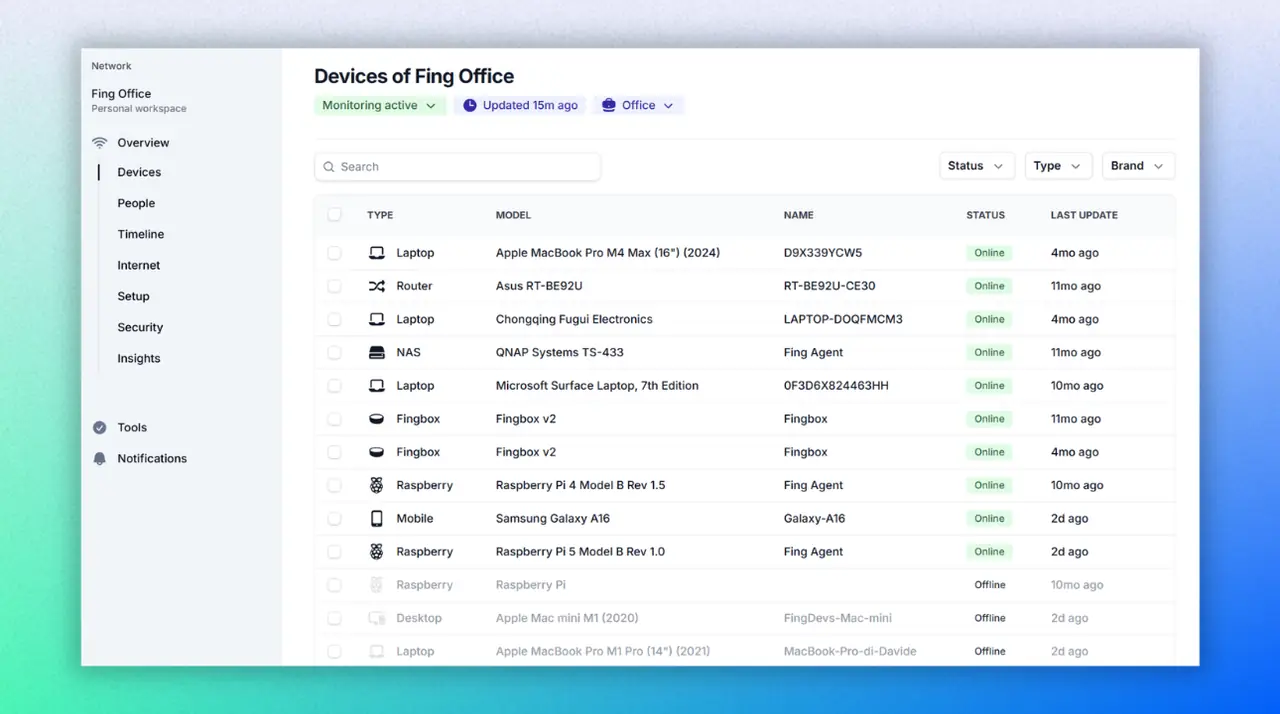
Fing scans the network you are on and identifies devices by type, brand and model — handy for spotting the ONT, an unknown camera or a neighbour on the Wi-Fi. The free tier covers a few manual scans a day, speed tests and ISP reports; Premium adds continuous monitoring, alerts and device blocking, which need Fing Desktop, Fing Agent or a Fingbox running on the network. Google Play shows 50,000,000+ installs. There is no Linux desktop app; Fing Agent covers Linux and Docker.
Screenshots


Key features
- Device scan with type, brand and model recognition
- Speed tests and ISP performance reports
- Premium: continuous monitoring, new-device alerts and blocking
- Fing Desktop for Windows and macOS
Pros
- Pro: Excellent device identification
- Pro: Works on phone and PC
Cons
- Con: Free tier limited to a few manual scans a day
- Con: Monitoring features need a paid plan
What's new in 4.0.4
See what changed in 4.0.4 in the official release notes
Version history
Version 4.0.4Latest
23 Jul 2026- SHA-256
- The developer does not publish one
- Source
- Release notes
- SHA-256
- The developer does not publish one
- Source
- Release notes
Official downloads by platform
For Windows, use the Download button. Other platforms go straight to the publisher's own page or official store.
Requirements
- OS
- Android 8.0 or later; iOS 16.4 or later; Fing Desktop: Windows and macOS
- Architecture
- Android phone, iPhone, Windows PC or Mac
Licence
- Type
- Freemium
- Licence
- Free tier; Premium and Professional subscriptions
- Publisher
- fing.com
Where these facts come from
- Google Play — developer "Fing Limited"
- App Store (India) — seller "Fing Limited"
- Fing Desktop
- Fing pricing
Checked 30 Oct 2026
FAQ
Is Fing free?
There is a free tier with up to three manual scans a day, speed tests and basic troubleshooting. Premium and Professional are paid subscriptions that add monitoring, alerts and blocking.
User reviews
User reviewsयूज़र रिव्यू
No reviews yet
Used Fing (app and Fing Desktop)? Reviews appear after moderation; we never import or invent ratings.
Alternatives
- WiFiman1.3.0 · FreeUbiquiti's free Wi-Fi analyser, speed test and network scanner for phones and PCs. Official No bundlesAvailable on Windows, macOS, Linux, Android, iOS
- Advanced IP Scanner2.5.4594.1 · FreeFree Windows LAN scanner that finds every device, its IP and MAC address in seconds. Official No bundles
- Angry IP Scanner3.12.1 · Open sourceFast, free and open-source IP and port scanner for Windows, macOS and Linux. Official No bundlesAvailable on Windows, macOS, Linux
Fing (app and Fing Desktop)
4.0.4 · Not stated