TP-Link Easy Smart Configuration Utility
v1.3.17.0FreeReleased 28 Dec 2023
Windows tool to find and configure TP-Link Easy Smart switches such as the TL-SG105E and TL-SG108E. By TP-Link
- Windows
By the ToolsBharat teamUpdated 28 Dec 2023How we check
Quick answer
TP-Link Easy Smart Configuration Utility is free software for Windows from TP-Link. Windows tool to find and configure TP-Link Easy Smart switches such as the TL-SG105E and TL-SG108E. Download it only from support.omadanetworks.com. The latest version we track is 1.3.17.0 (28 Dec 2023). ToolsBharat links straight to the publisher's own download page, with no bundled offers.
- Latest version:
- 1.3.17.0 (28 Dec 2023)
- Publisher:
- TP-Link
- Official site:
- support.omadanetworks.com
- Licence:
- Free — Proprietary — free
- Requirements:
- Windows
Our verdict
TP-Link's Easy Smart switches (TL-SG105E, TL-SG108E, TL-SG108PE, TL-SG116E, TL-SG1016DE and others) are favourites for small offices and ISP distribution points because they add VLANs, QoS and port mirroring at a low price. This utility finds the switch on your network even when you do not know its IP, then lets you set VLANs, port settings and firmware. Version 1.3.17.0 added the DS1xxGE series and TL-SG1016DE/1024DE V7.
Screenshots

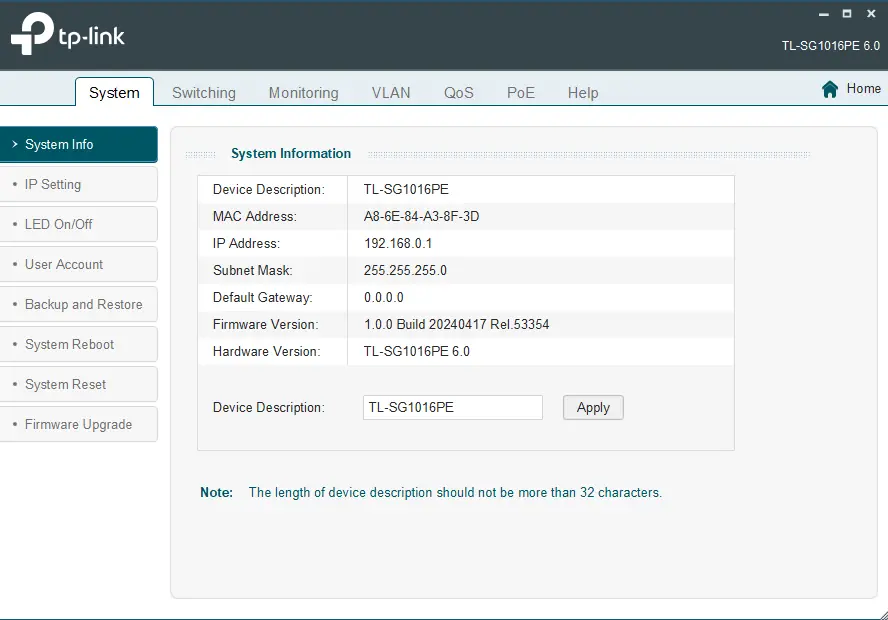

Key features
- Finds Easy Smart switches on the LAN without knowing their IP
- VLAN (802.1Q, port-based, MTU), QoS, IGMP snooping and port mirroring
- Firmware update for supported switches
Pros
- Pro: Free and simple
- Pro: Supports a long list of Easy Smart models and hardware versions
Cons
- Con: Windows only
- Con: Latest version dates from December 2023
What's new in 1.3.17.0
See what changed in 1.3.17.0 in the official release notes
Version history
Version 1.3.17.0Latest
28 Dec 2023 · 57.0 MB- SHA-256
- The developer does not publish one
- Source
- Release notes
Requirements
- OS
- Windows
- Architecture
- Not stated
Licence
- Type
- Free
- Licence
- Proprietary — free
- Publisher
- support.omadanetworks.com
Where these facts come from
Checked 30 Oct 2026
FAQ
Is there a Mac or Linux version?
No — TP-Link lists the utility for Windows only. Many newer Easy Smart hardware versions also have a web interface; check your model's user guide for its default IP.
The utility cannot find my switch — why?
Connect the PC directly or on the same LAN segment, temporarily allow the utility through Windows Firewall, and make sure your switch model and hardware version appear in the utility's supported list.
User reviews
User reviewsयूज़र रिव्यू
No reviews yet
Used TP-Link Easy Smart Configuration Utility? Reviews appear after moderation; we never import or invent ratings.
Alternatives
- TP-Link Download Center (Wi-Fi adapter drivers)Varies by model (see Download Center) · FreeOfficial drivers for TP-Link USB, PCIe and Bluetooth adapters by model. Official No bundlesAvailable on Windows, macOS, Linux
- Omada Discovery Utility5.4.0 · FreePoints Omada access points in another subnet to your Omada controller. Official No bundlesAvailable on Windows, Linux
- NETGEAR Discovery Tool (switch discovery)2.0.7 · FreeFinds NETGEAR Plus, Smart and Insight switches on your LAN and opens their web interface. Official No bundlesAvailable on Windows, macOS, Linux
TP-Link Easy Smart Configuration Utility
1.3.17.0 · 57.0 MB