Tftpd64
v4.74Open sourceReleased 21 Oct 2025
Free TFTP, DHCP, DNS and Syslog server in one small Windows app — a staple for firmware recovery. By Philippe Jounin
- Windows
By the ToolsBharat teamUpdated 21 Oct 2025How we check
Quick answer
Tftpd64 is open source software for Windows from Philippe Jounin. Free TFTP, DHCP, DNS and Syslog server in one small Windows app — a staple for firmware recovery. Download it only from github.com. The latest version we track is 4.74 (21 Oct 2025). ToolsBharat links straight to the publisher's own download page, with no bundled offers.
- Latest version:
- 4.74 (21 Oct 2025)
- Publisher:
- Philippe Jounin
- Official site:
- pjo2.github.io
- Licence:
- Open source — GPL-2.0
- Requirements:
- Windows
Our verdict
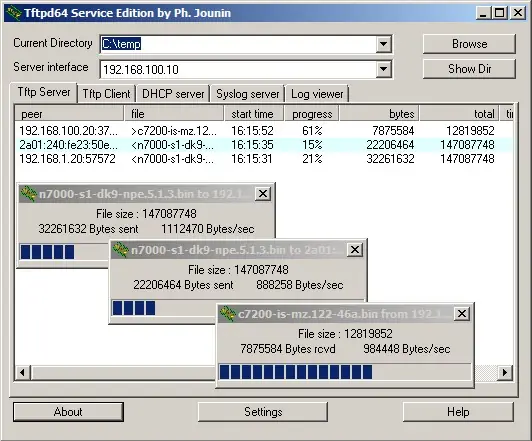
Many routers, ONTs and switches recover from a bad flash by fetching firmware over TFTP, and Tftpd64 is the free Windows tool technicians use for it. It bundles a TFTP server and client with DHCP, DNS, SNTP and Syslog servers, and can run as a Windows service. tftpd64.com redirects to the project's GitHub page, but that page's quick link still points to an older version — take the current release (4.74, which added files larger than 4 GB) from GitHub Releases. Installer, portable and service builds are available, plus 32-bit Tftpd32.
Screenshots
Key features
- TFTP server and client for firmware recovery and config backups
- Built-in DHCP, DNS, SNTP and Syslog servers
- Runs as an app or a Windows service; IPv6-ready
- Installer, portable ZIP and service builds (64-bit and 32-bit)
Pros
- Pro: Open source and tiny
- Pro: Syslog server is handy for debugging routers
Cons
- Con: The project page's quick link lags behind GitHub Releases
- Con: Windows only
What's new in 4.74
See what changed in 4.74 in the official release notes
Version history
Version 4.74Latest
21 Oct 2025- SHA-256
- The developer does not publish one
- Source
- Release notes
Requirements
- OS
- Windows
- Architecture
- 64-bit (Tftpd64) and 32-bit (Tftpd32)
Licence
- Type
- Open source
- Licence
- GPL-2.0
- Publisher
- pjo2.github.io
Where these facts come from
Checked 30 Oct 2026
FAQ
How do I use Tftpd64 to recover a router?
Follow your router maker's recovery guide: it will say which static IP to give the PC and what to name the firmware file. Put the file in Tftpd64's folder, select the right network interface, allow Tftpd64 through Windows Firewall, then start the router in recovery mode.
User reviews
User reviewsयूज़र रिव्यू
No reviews yet
Used Tftpd64? Reviews appear after moderation; we never import or invent ratings.
Alternatives
- WinSCP6.7 · Open sourceSFTP, FTP and SCP file transfer client for Windows. Official No bundles
- PuTTY0.85 · Open sourceClassic free SSH and Telnet client for Windows. Official Developer SHA-256 No bundles
- Tera Term5.7.1 · Open sourceFree, open-source serial and SSH terminal for Windows — ideal for console cables to switches and OLTs. Official Developer SHA-256 No bundles

Tftpd64
4.74 · Not stated